

HR Software


Quick answer: Employee self service portals are the staff-facing layer of an HR system where people manage their own pay slips, leave, personal details, policy sign-off and training. The hidden cost of not having one is the HR hours lost to routine requests and the errors that creep in when data is re-keyed by hand. Both are recoverable when staff manage their own records against a single source of truth.
If you run operations or finance, here is the question worth asking. How many hours does your HR team spend each week answering the same requests, and how many payroll corrections trace back to a detail someone typed in twice?
That is the real cost, and it rarely shows up on a line item. It hides inside HR salaries, inside rework, and inside the pay run that has to be fixed after the fact. Employee self service portals move that routine work from the HR inbox to the individual, which is both faster and more accurate.
This is general information, not legal advice. For obligations specific to your business, check the primary sources or speak to a qualified adviser.
An employee self service portal, often shortened to ESS, is the part of an HR system your staff log into directly. Instead of emailing HR to book leave or ask for a pay slip, they do it themselves.
A capable portal lets staff:
The pattern is simple. Routine admin that used to sit in the HR queue now sits with the person who owns the information. HR moves from processing requests to managing the exceptions that genuinely need a human.
Picture a growing Australian business. Headcount has climbed past a hundred, HR is still a team of two, and the inbox never empties.
Every leave request is an email. Every pay slip reissue is an email. Every address change, bank detail update and policy question is another email, and each one gets re-keyed by hand into the payroll or HR file. The team is busy, but a lot of that work is low value and repetitive.
The consequence shows up in two places. First, HR capacity gets eaten by requests that a portal could handle in seconds. Second, every manual re-key is a chance for an error, and those errors flow downstream into pay.
That second point matters more than it looks. Under Single Touch Payroll, employers report pay, tax and super to the ATO with every pay run, which means the data feeding it has to be accurate at the source. According to the ATO, STP reporting happens each pay event, so a wrong bank account or an out-of-date tax detail is not a private mistake. It is a reporting problem. The fix is to stop re-keying and let the record hold one accurate version that payroll draws from.
There is a timing obligation too. The Fair Work Ombudsman requires employers to give employees a pay slip within one working day of payday. When pay slips live in a portal, that access is immediate and provable rather than a manual send that someone has to remember.
Here is the same week of routine work, done the manual way and the self-service way.
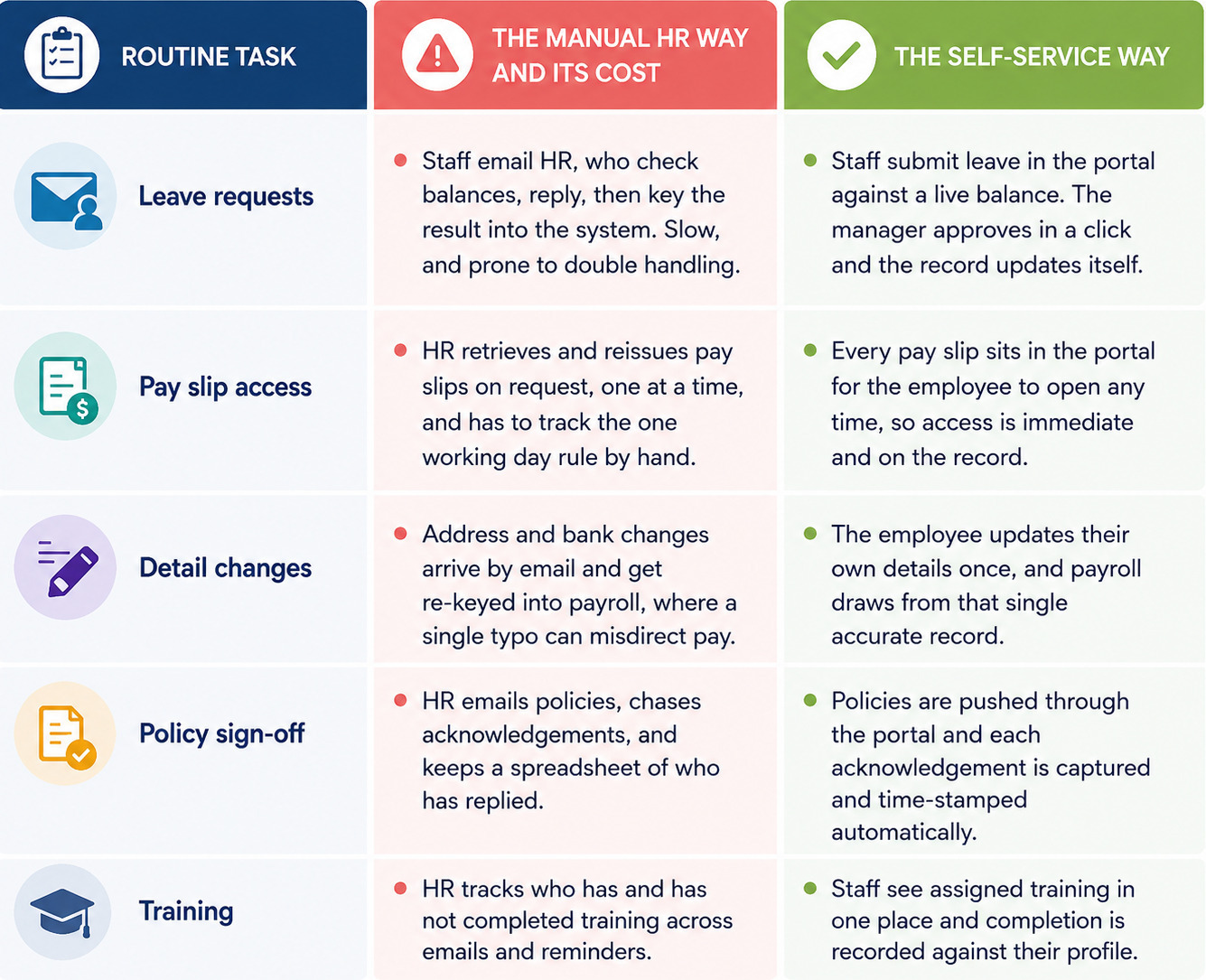
The difference is not one dramatic saving. It is the same small friction removed from dozens of tasks a week, and the removal of the re-keying step that quietly feeds errors into pay.
Moving personal and payroll data into a portal raises a fair question about risk. The honest answer is that the risk already exists, and it is often worse in the manual world of emailed forms and scattered spreadsheets.
The scale is real. The OAIC recorded 1,205 notifiable data breaches in Australia in 2025, an all-time high, and human error caused 37 per cent of breaches in the January to June 2025 period. Personal details sitting in inboxes and shared drives are exactly the kind of exposure that human error creates.
A portal helps by giving each person one controlled place to manage their own information, with access tied to the individual rather than an email thread that copies half the office. It reduces the number of hands that touch a bank account number before it reaches payroll.
Not every portal earns its keep. A few things separate the useful from the ornamental.
This is where the platform matters. Sentrient's HRIS system gives employees and managers self-service against one record that also holds compliance evidence. It is Melbourne-based, Australian built and owned, and trusted by more than 1,000 Australian organisations. To be clear about scope, Sentrient is compliance-led and integrates with payroll. It is not a payroll engine, so it works alongside your payroll rather than replacing it.
The rollout is where good intentions either stick or fade. A staged approach works better than a big-bang switch.
Communicate the why, not just the how. Staff adopt a portal faster when they understand it means faster answers for them, not more work.
For the deeper feature breakdown behind all of this, the original guide on employee self service portals walks through the capabilities that matter most.
The cost of doing HR admin by hand is quiet but real. It is the hours your team loses to repeat requests and the errors that re-keying feeds into pay. Neither is a fixed cost of doing business. Both shrink when staff manage their own records against a single accurate source, and when managers get self-service too.
A portal built into the HRIS supports accuracy at the point where Single Touch Payroll needs it, supports timely pay slip access, and helps keep personal data in one controlled place. It does not do the whole job of compliance on its own, and it should not claim to. It removes the friction and the re-keying, which is where the recoverable cost sits.
If you want to see how employee and manager self-service work against one record, book a free demo and ask for the self-service rollout checklist while you are there. It is a short, practical guide to staging the change without disrupting a single pay run.
Employee self service, or ESS, lets staff manage their own leave, pay slips, details, policy sign-off and training. Manager self service, or MSS, gives managers approvals, team leave visibility and reporting. ESS takes routine work off HR, and MSS takes approval pressure off the managers above them.
No. A compliance-led portal like Sentrient integrates with payroll rather than running it. Staff maintain accurate personal and leave data in the portal, and that clean data feeds toward payroll. Sentrient is not a payroll engine, so it works alongside your existing payroll instead of replacing it.
The ATO requires employers to report pay, tax and super with every pay run under Single Touch Payroll, so the data feeding it must be accurate. When employees update their own details once in a portal, you remove the manual re-keying step that introduces errors before that reporting even happens.
The Fair Work Ombudsman requires a pay slip within one working day of payday. A portal that stores each pay slip for immediate access supports that obligation by making retrieval instant and on the record. Always confirm your specific obligations against the primary source or a qualified adviser.
A portal can reduce risk compared with emailed forms and shared spreadsheets. The OAIC recorded 1,205 breaches in Australia in 2025, with human error a leading cause. Giving each person one controlled place to manage their own data limits how many hands touch sensitive details before they reach payroll.